Program Hierarchy Analysis

Document your IBM i applications in minutes.

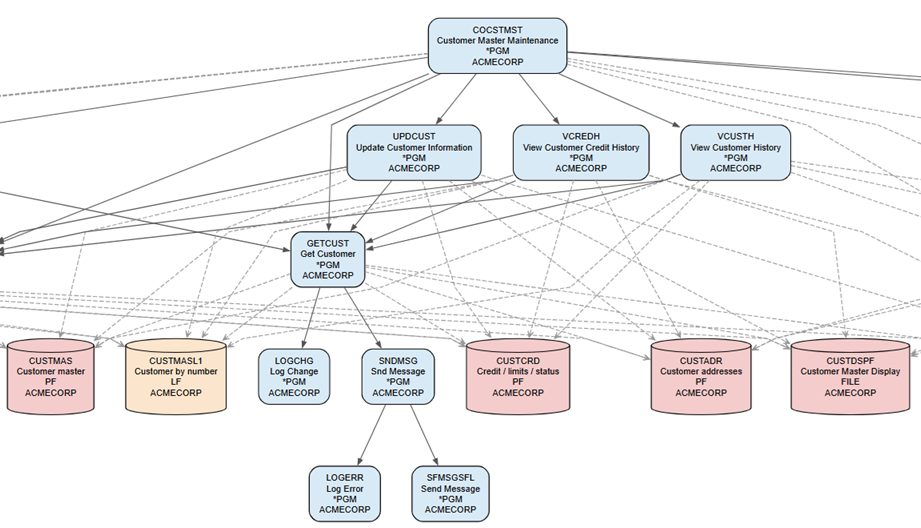
Here we provide an open source utility to document your IBM i application programs using commands DSPOBJD and DSPPGMREF combined with a Powershell script. The results can be viewed in a web browser, as PDF or copied into Microsoft Word or Excel for further analysis. Flow chart diagrams can be generated with help of Graphviz open source graph visualization software.

Document your IBM i (AS/400) applications quickly and efficiently. With this tool, you can generate a clear, hierarchical view of your programs, their calls and dependencies, enabling faster understanding and analysis of complex legacy systems. Also contains a rapid documentation utility to capture screens and automatically save them to a MS Powerpoint document.

This tool is designed to support:
  • Impact analysis
  • Application understanding
  • Modernization and refactoring efforts
  • Knowledge transfer for legacy IBM i applications


Steps:


1. Inspect deliverables

+ Click for details

Call Stack Analysis - Visual depiction of program call stack

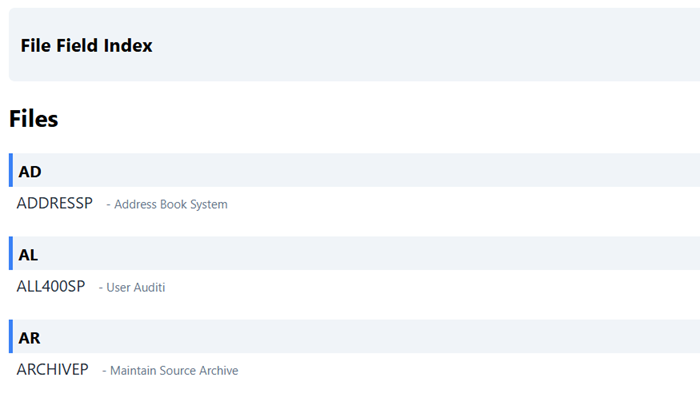
Application Menu - convert your menu into an HTML index page for quick reference.

Note that all application data is fabricated for demonstration purposes.

2. Capture your IBM i object information for a specific library

Save this information to IBM i tables UTLP501 and UTLP502. We use the DSPOBJD command to capture this information.

+ Click for details

Reproduce and run this CL program on IBM i

  
   /* -------------------------------------------------------------- */
   /* PROGRAM: UTLC501                                               */
   /* CL PROGRAM TO MAKE                                             */
   /* 1. A LIST OF ALL OBJECTS  IN A LIBRARY                         */
   /*         (FILE: UTLP501)                                        */
   /* 2. A LIST OF ALL PROGRAMS IN A LIBRARY                         */
   /*         (FILE: UTLP502)                                        */
   /* THIS PROGRAM MAY BE RUN MULTIPLE TIMES, ONCE FOR EACH          */
   /* LIBRARY TO ANALYSE                                             */   
   /*                                                                */
   /* PARMS                                                          */
   /*   &FROM_LIB - LIBRARY WE WANT TO ANALYSE                       */
   /*   &TO_LIB   - LIBRARY TO STORE OBJECT DATA                     */
   /*   &ACTION   - *ADD OR *REPLACE                                 */
   /*               (*ADD CAN BE USED IF MORE THAN ONE LIBRARY       */
   /*               TO ANALYSE)                                      */
   /* -------------------------------------------------------------- */
   /* Usage:                                                         */
   /* -------------------------------------------------------------- */
   /*  CALL UTLC501 PARM(('OBJ_LIB1') ('UTL_LIB') ('*REPLACE'))      */
   /*  CALL UTLC501 PARM(('OBJ_LIB2') ('UTL_LIB') ('*ADD'))          */   
   /* Where:                                                         */
   /* OBJ_LIB1 is where your programs reside                         */
   /* UTL_LIB is where you want to store this file                   */
   /* parameter: *ADD or *REPLACE                                    */
   /*                                                                */
   /*  EXAMPLE:                                                      */
   /*   CALL UTLC501 PARM(('DATALIB1') ('PJCSCYTM1') ('*REPLACE'))   */   
   /*   CALL UTLC501 PARM(('PGMLIB1') ('PJCSCYTM1') ('*ADD'))        */
   /*   CALL UTLC501 PARM(('PGMLIB2') ('PJCSCYTM1') ('*ADD'))        */
   /* -------------------------------------------------------------- */

 PGM PARM(&FROM_LIB &TO_LIB &ACTION)

    DCL VAR(&FROM_LIB)   TYPE(*CHAR) LEN(10)
    DCL VAR(&TO_LIB)     TYPE(*CHAR) LEN(10)
    DCL VAR(&ACTION)     TYPE(*CHAR) LEN(10)

    /* Make list of all objects - this file is downloaded to PC */

    DSPOBJD OBJ(&FROM_LIB/*ALL) OBJTYPE(*ALL) +
       OUTPUT(*OUTFILE) OUTFILE(&TO_LIB/UTLP501) +
       OUTMBR(*FIRST &ACTION)

    /* Make list of all programs - this file is used as input in */
    /* program UTLC502                                           */

    DSPOBJD OBJ(&FROM_LIB/*ALL) OBJTYPE(*PGM) +
       OUTPUT(*OUTFILE) OUTFILE(&TO_LIB/UTLP502) +
       OUTMBR(*FIRST &ACTION)

  ENDPGM

3. Create a list of program to program relationships.

Here we use the DSPPGMREF command against the list of programs just created above. This creates a list of programs and files used in each program. We save this information to table UTLP503.

+ Click for details

Reproduce this CL program and run on IBM i


   /* ----------------------------------------------------- */
   /* PROGRAM: UTLC502                                      */
   /* CL PROGRAM TO MAKE A LIST OF ALL PROGRAM AND FILE     */ 
   /* REFERENCES FOR PROGRAMS IN FOUND in                   */  
   /* OUTPUT FILE UTLP501                                   */
   /* ----------------------------------------------------- */
   /* USAGE:                                                */
   /* ----------------------------------------------------- */
   /*  CALL UTLC502 PARM(('UTL_LIB'))                       */
   /* ----------------------------------------------------- */

   PGM PARM(&TO_LIB)

   DCL VAR(&TO_LIB) TYPE(*CHAR) LEN(10)
   DCL VAR(&LOOP) TYPE(*LGL) VALUE('1')

   DCLF FILE(UTLP502)

   /* DELETE & CREATE FILE UTLP503 */

   DLTF &TO_LIB/UTLP503
   MONMSG  MSGID(CPF0000)
   
   DSPPGMREF PGM(QSYS/QCMD) OUTPUT(*OUTFILE) OUTFILE(&TO_LIB/UTLP503)
   MONMSG  MSGID(CPF0000)
   CLRPFM   FILE(&TO_LIB/UTLP503)

   /* LOOP THROUGH ALL PROGRAMS TO GET OBJECTS USED IN EACH ONE */

   DOWHILE  COND(&LOOP)
      RCVF
      MONMSG MSGID(CPF0864) EXEC(LEAVE)

      DSPPGMREF PGM(&ODLBNM/&ODOBNM) OUTPUT(*OUTFILE) +
         OUTFILE(&TO_LIB/UTLP503) OUTMBR(*FIRST *ADD)

   ENDDO

   ENDPGM


4. Using Client Access or similar utility, download tables UTLP501 and UTLP503 to Windows PC


+ Click for details

Download the following IBM i tables to PC:

IBM i table Save as Format Delimiter Titles
UTLP501 RF_ALL_OBJ.csv csv comma Yes
UTLP503 RF_PGM_REF.csv csv comma Yes

If you have not done this before, this video provides a general introduction


Note the following configuration settings

Setting Image
save as files RF_ALL_OBJ.csv, RF_PGM_REF.csv
type csv
include column names


5. Download powershell script files and related artifacts.


+ Click for details

Download powershell script file and examine scripts and related artifacts.


6. Create a list of programs to process


+ Click for details


Create a simple csv file called RF_program_list.csv in directory /csv_files This file will contain the list of top-level programs that you want to analyze. This may typically be a list of programs in your application menu or scheduled batch jobs. First line should contain column header: program.
Program below will generate a list of these programs in file called called menu.html based on this list

7. Run the powershell script


+ Click for details

Powershell generally comes in two flavors - versions 5 and 7. Our scripts are tested in both versions, but we will use Powershell 5 because it is more commonly installed on Windows machines.

  • Open Windows PowerShell console
    • Click Windows Start
    • Type CMD
    • Execute (as administrator if possible)
    • at command line: Type powershell <enter>
    • You should now be in Windows PowerShell console.

  • Check your PowerShell version
    • type $PSVersionTable.PSVersion
    • You should see 5.1.xxxx.

  • Navigate to your script folder
    • Example: cd c:\mydir\powershell_scripts

  • Run the .ps1 script
    • type .\RF_PGM_REF.ps1
    • If you get an error try command, type set-executionpolicy remotesigned
    • If this does not work, search online for powershell set-executionpolicy for more specific advice

New to powershell? A lesson or two may be in order...